JPG vs WebP vs AVIF vs PNG: Which Format Should You Use?
Updated September 18, 2026
Four image formats cover virtually every need, but they are not interchangeable. Here is the honest comparison, with the numbers that matter.
The short version
- JPG: the universal photo format. Everything since 1992 opens it. No transparency.
- PNG: lossless with transparency. Right for graphics, screenshots, anything pixel-exact. Inefficient for photos.
- WebP: the modern default. 25–35% smaller than JPG at equal quality, full transparency, supported everywhere since ~2020.
- AVIF: the compression champion. ~50% smaller than JPG. Slower to encode; supported in all current browsers but absent in older Safari.
Size comparison at equal visual quality
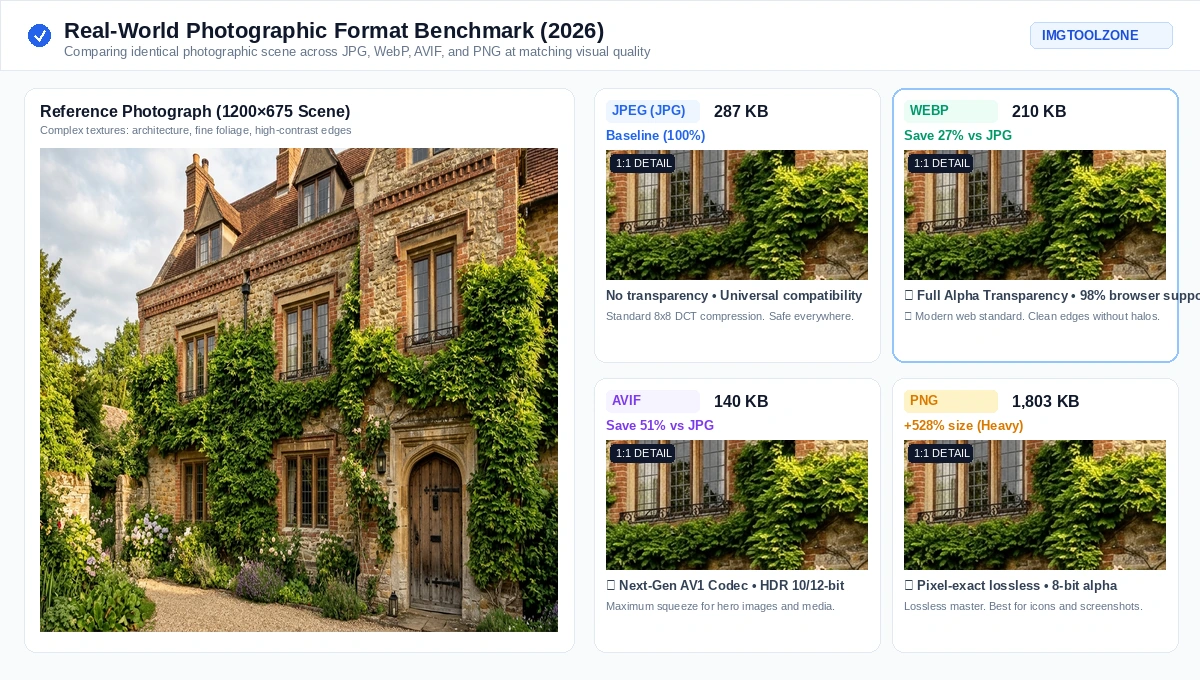
For a typical photograph, encoding the same pixels at visually-matching quality:
| Format | Relative size | Notes |
|---|---|---|
| PNG | ~600% of JPG | Lossless; photos balloon |
| JPG | baseline (e.g. 300 KB) | Universal compatibility |
| WebP | ~70% of JPG | Transparency included |
| AVIF | ~50% of JPG | Best compression, slowest encode |
When to use each one
Use JPG when compatibility is non-negotiable: email attachments, older software, print shops, marketplaces that demand it. For a photo that must open everywhere, JPG is still the safe answer.
Use PNG when you need lossless pixels or transparency: logos, screenshots, UI graphics, line art, medical/scientific images. If a photo has no transparency need, PNG wastes bytes. Convert it with the PNG to JPG tool or PNG to WebP.
Use WebP when you control the destination and want the best size/compatibility trade-off: websites, apps, any modern context. Converting a JPG library is a one-click win with JPG to WebP, and WebP files exported at conservative settings often shrink another 25–30% through the WebP compressor with no change of format and no visible loss.
Use AVIF when maximum compression matters and your audience is on current browsers: hero images, high-traffic pages. Encode time is seconds rather than instant. See JPG to AVIF.
You do not have to choose: serve two formats
A site-wide decision is not required. HTML's picture element lets the browser pick for itself. Inside one picture element you list, in order:
- a source for the AVIF file, with its type set to image/avif
- a source for the WebP file, with its type set to image/webp
- a plain img pointing at the JPG, carrying the alt text
The browser takes the first format it understands, so AVIF-capable browsers get the smallest file, everything else falls back cleanly, and older clients still get the JPG. Two details people get wrong: the alt text belongs on the img, not on the sources, and the img is not optional — it is the element that actually renders.
Choosing a quality setting
Quality is not a number to maximise. It is a dial to find the lowest acceptable value on:
- Start around 75–80 for photos in any lossy format. This is usually indistinguishable from the original at normal viewing size.
- Compare at 100% zoom, not fit-to-screen. Downscaling hides exactly the artefacts you are inspecting for.
- Watch smooth gradients and flat colour areas — skies, studio backdrops, skin. Banding appears there first, long before detailed areas suffer.
- The same number means different things across formats. AVIF at 75 is not visually equal to JPG at 75, so judge by result rather than by the label.
Does converting recover quality?
No, and any tool claiming otherwise is lying. If a JPG already discarded data, converting to PNG preserves exactly what remains, pixel-for-pixel. Conversion changes the container and future compression, never the past. What conversion CAN do: stop generation loss (a PNG can be re-saved without further degradation) or shrink the file with modern codecs.
Do not stack lossy conversions
Each lossy encode discards information permanently, and the losses accumulate. Converting JPG to WebP to AVIF applies three rounds of loss, and the artefacts of each step become input that the next step faithfully tries to preserve.
Always convert from the highest-quality original you have. If all you have is a JPG, convert from that JPG directly to your target rather than passing through another lossy format on the way. This is also the argument for keeping originals: an archived master lets you re-encode to whatever format wins in five years.
Transparency: which formats support it?
- PNG: full 8-bit alpha (plus 16-bit in some tools)
- WebP: full 8-bit alpha, at a fraction of PNG's size
- AVIF: full alpha plus HDR and 10/12-bit color
- JPG: none, ever. Transparent areas flatten to a background color you choose.
Summary
JPG for universal photos, PNG for lossless/graphics, WebP as the modern default, AVIF for maximum squeeze. Convert between any of them free with the image converter. All processing happens in your browser.