Image Compressor
Compress
The canvas previews the compressed result live as you adjust the settings. Click Compress for the exact size and a before/after split — drag the divider to judge the quality, then download. The original file is never modified.
Your images are processed locally in your browser and never uploaded to any server.
Shrink photos and graphics up to 90% smaller, right in your browser. Works with JPG, PNG, WebP and AVIF, keeps the quality you choose, and never uploads your files anywhere. Compress one image or a whole batch, free, with no watermark and no sign-up.
Everything runs locally on your device. There is no upload wait, no file limit imposed by a server, and nothing stored anywhere.
How to use the image compressor
- Drag and drop your image (or click "Choose Images"). Multiple files are welcome.
- Pick the output format and drag the quality slider until the preview looks right.
- Watch the live size estimate update as you adjust, and compare before/after previews.
- Click Download to save a single image, or Download All to get everything as a ZIP.
Frequently asked questions
Are my images uploaded to a server?
No. Compression happens entirely inside your browser using the same engine that renders web pages. Your files never leave your device, which is also why there is no file limit imposed by a server.
How much smaller will my image get?
Typical photos shrink 60–90% with barely visible difference at quality 80. PNG graphics with flat colors convert extremely well to WebP. The tool shows the exact size and percentage saved before you download.
What quality setting should I use?
Start at 80. It is visually indistinguishable from the original for most photos. Use 60–70 for web images where every kilobyte matters, and 90+ for images that will be re-edited later.
Is there a limit on file size or number of images?
You can compress images up to 50 MB each and up to 30 files at a time, entirely free. These limits exist only to keep your browser responsive. There is no payment tier that removes them.
Quality vs. file size comparison
Inspect real photographic compression at 100% zoom. Quality 80 preserves virtually identical architectural masonry and foliage detail while slashing file size by 84%.
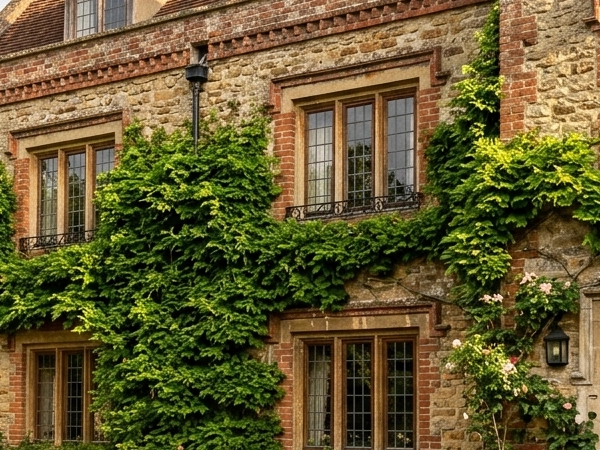
2.4 MB
Full baseline master
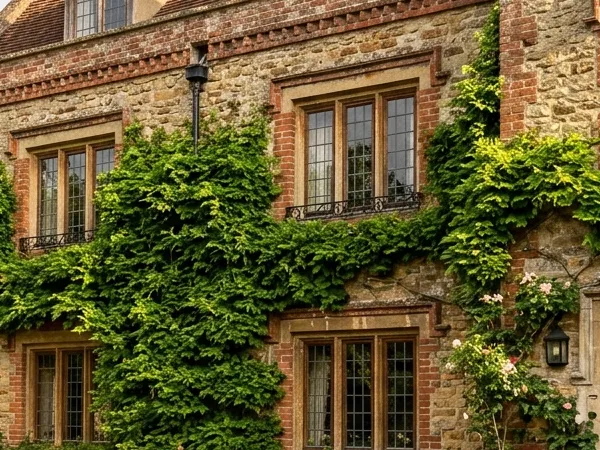
380 KB (-84%)
Visually identical detail
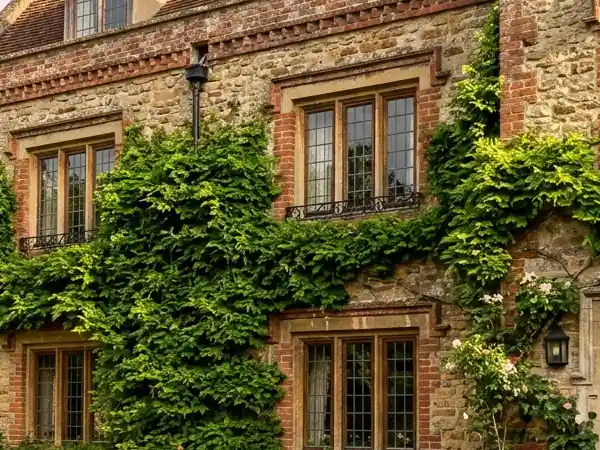
115 KB (-95%)
Minor texture smoothing
Learn more
- How to Check if an Online Image Tool Uploads Your Photos
Learn how to investigate whether an online image tool sends image data away from your device using browser network tools and a scoped offline test.
- How to Compress Images Without Losing Quality
A practical guide to image compression: quality settings that work, when to compress vs resize, and format choices (JPG, WebP, AVIF), with a free browser tool.